DrawSQL MCP Server
Turn SQL into ER diagrams straight from Claude Code, Cursor or any MCP client. Your agent reads your team's diagrams and proposes changes you review before they land.
Visualize your first schema without an account.



You ask
Diagram the PostgreSQL schema in db/schema.sql in DrawSQL, including its foreign-key relationships.
Your agent calls
visualize_schema
driver: "pgsql"
ddl: "CREATE TABLE users (id bigint PRIMARY KEY, …"
DrawSQL returns
Your diagram is ready: https://drawsql.app/draw?t=…
Driver: pgsql · Tables: 4 · Columns: 12 · Relationships: 4
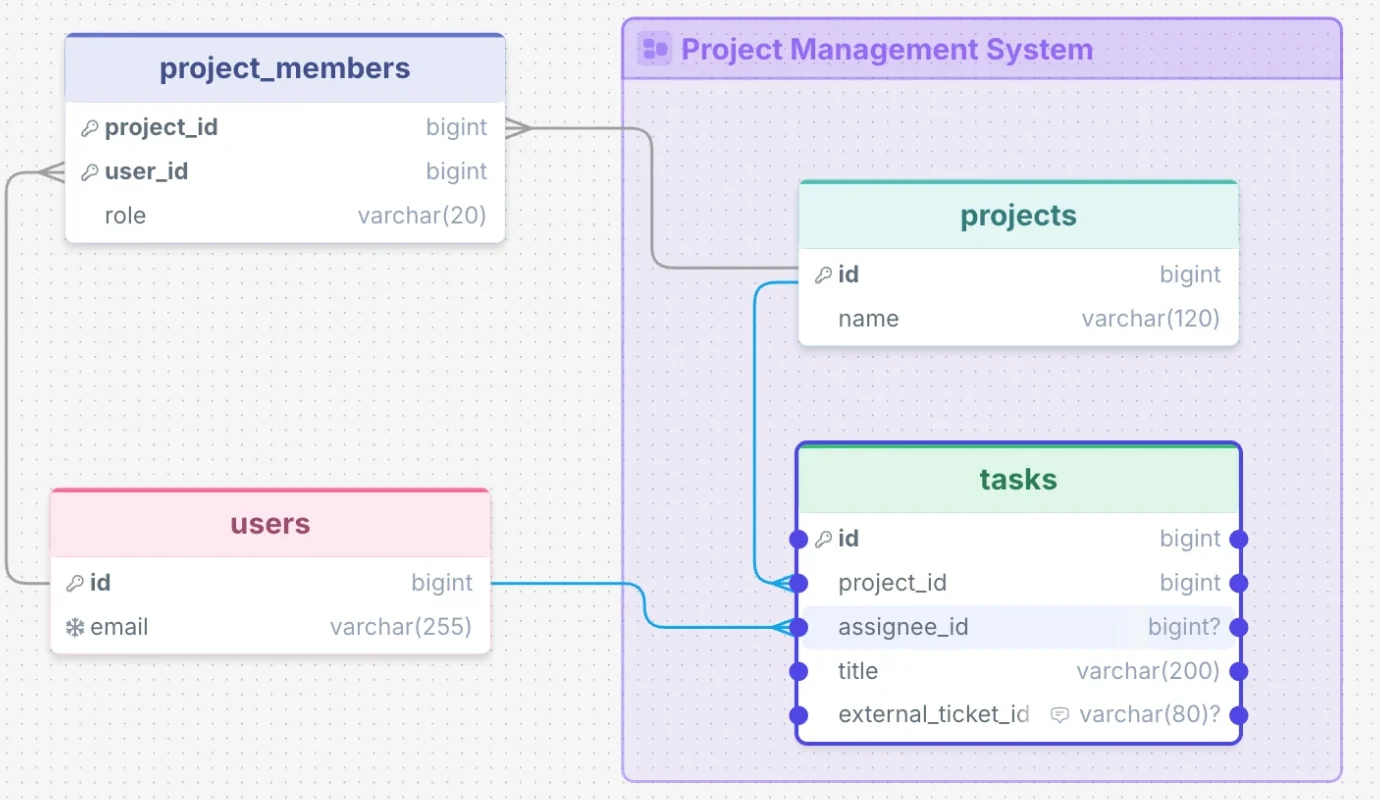
You ask
Design a PostgreSQL schema for a help desk where customers open support tickets. Create a private DrawSQL diagram called Help Desk.
Your agent calls
create_diagram
name: "Help Desk"
driver: "pgsql"
ddl: "CREATE TABLE customers (…)"
DrawSQL returns
Diagram created: https://drawsql.app/teams/…/diagrams/help-desk
uuid: …
Driver: pgsql · Tables: 2 · Columns: 6 · Relationships: 1
Requires a read and write token.
You ask
In the Orders service diagram, how do orders and users relate? Show me the SQL join.
Your agent calls
list_diagrams → get_schema
Your agent answers
Each order belongs to a user.
SELECT orders.id, users.email
FROM orders
JOIN users ON orders.user_id = users.id;
Requires an API token.
You ask
Read my Orders service diagram in DrawSQL and propose adding a nullable shipped_at timestamp to orders.
Your agent calls
list_diagrams → get_schema
→ get_driver_rules
→ propose_diagram_changes
DrawSQL returns
Your proposal is ready to review.
Add orders.shipped_at — timestamp, nullable.
Open proposal →
Your diagram stays unchanged until you apply it.
Requires a read and write token.
Examples
Prompts to try
Paste one into your agent. The first works without an account. The others need an API token.
No account
Diagram the schema in your repo
Your agent reads the migrations and returns an editable ER diagram. Share the link with anyone on the team.
Visualize the schema in database/migrations as a DrawSQL diagram. Use PostgreSQL.
API token
Read the diagram before a migration
Your agent writes the migration against the schema your team designed in DrawSQL. get_schema gives it the schema as compact Markdown.
Read the Orders service diagram in DrawSQL, then write a migration that adds a shipped_at column to orders.
From the get_schema response
## orders
id: bigint PK auto
user_id: bigint FK
status: varchar(20) default:'pending'
total: decimal(10,2)

## Relationships
users.id → orders.user_id (one-to-many)
API token
Link the diagram in a pull request
Reviewers open the diagram straight from the PR description.
Add the DrawSQL link for the Orders service diagram to this pull request's description.
Read and write token
Propose a change to a diagram
You get a review link showing the proposed diff on the canvas. The diagram stays unchanged until an editor applies it.
Propose a nullable notes column on the orders table in my Orders service diagram.
A better flow for agent writes
Shape the change before you apply it.
Your agent drafts a proposal. Review the diff in DrawSQL, send back feedback, and apply when it’s right.
- See exactly what changes. Additions, edits and removals are highlighted on your diagram.
- Turn feedback into a better proposal. Decline with a reason, then ask your agent to revise.
- Apply with a way back. DrawSQL saves a version first. Undo restores it.
A review loop you control
-
Propose
Your agent drafts a change to your diagram.
-
Review
Open the link and inspect the visual diff.
-
Refine if needed
Decline with feedback. Ask your agent to revise.
-
Apply
Update your diagram when you’re happy with the proposal.
You ask
“Propose a nullable notes column of type text on orders in my Orders service diagram.”
Your agent calls
list_diagrams → get_schema
→ get_driver_rules
→ propose_diagram_changes
DrawSQL returns
Add orders.notes — text, nullable.
Open proposal →
You review and apply
Inspect the diff, then click Apply changes to update your diagram.
Capabilities
What your agent can do
visualize_schema works without an account. The other tools need an API token, and API tokens are on paid plans.
Ready to try it? Connect your agent and create your first diagram.
No account
visualize_schema
Turns SQL or a schema patch into a link to a DrawSQL canvas, with tables arranged and foreign keys connected.
With an API token
list_diagrams
Lists the diagrams your token can access, with names, table counts and URLs.
get_schema
Returns one diagram's schema as compact Markdown. Your agent reads it before it writes a query or a migration.
get_diagram_link
Returns the canvas and embed URLs for a pull request or a README.
get_driver_rules
Returns the supported data types and schema patch format for MySQL, PostgreSQL or SQL Server.
get_proposal_status
Reports whether a proposal is pending, applied, declined or expired, with the reviewer's reason for a decline.
With a read and write token
create_diagram
Creates a private diagram in the token's team from SQL or a schema patch.
propose_diagram_changes
Proposes a change to an existing diagram and returns a review link for you.
- Tokens are read only by default. Choose Read and write when you create one to get the write tools.
- A token belongs to one team, and it sees only that team's diagrams.
-
Without a token, the only tool is
visualize_schema, and it only creates new links. -
visualize_schemaanswers with the driver and counts, never your table or column names.
FAQ
Frequently asked questions
It is a hosted Model Context Protocol server at https://drawsql.app/mcp. AI editors and coding agents connect to it over streamable HTTP, so there is nothing to install. Its tools turn SQL into an editable ER diagram and, with an API token, read the diagrams your team keeps in DrawSQL.
Not to turn a schema into a diagram. visualize_schema works without an account, and the link it returns opens the full editor without signup. Reading your team's diagrams needs an API token. Paid plans can create one under Account → API tokens.
Any MCP client that supports streamable HTTP. Follow the setup guide for Claude Code, Codex, Cursor or VS Code.
Yes, with an API token. The token belongs to one team. The agent can list that team's diagrams and read each schema as compact Markdown.
No. An agent can only propose a change to an existing diagram. An editor reviews the proposal as a diff in DrawSQL, then applies or declines it. Creating a new private diagram needs no review.
MySQL, PostgreSQL and SQL Server.
DrawSQL MCP
Add DrawSQL to your agent’s toolkit.
Visualize schemas, read your team’s diagrams, and propose changes you review in DrawSQL.